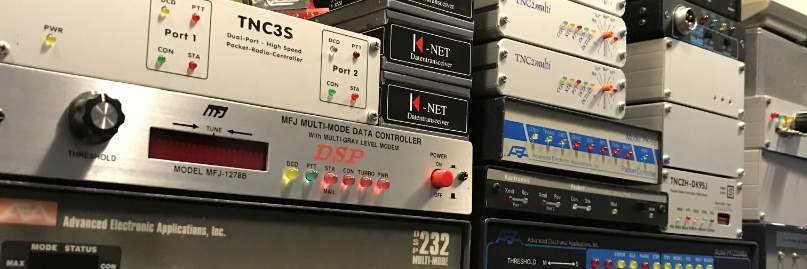
Linfbb port.sys

Voorbeeld van port.sys die ik gebruik voor pi8lap

# BBS port.sys
#
# Number of Com Ports (not including Com 0) and TNCs
  3      10
#
# Interface 7 = TCPIP
# Interface 9 = LINUX
#
#Com Interface Adress (Hex)  Baud
 1   9           0       115200
 2   9        189C         0
 3   9        189D:189E:77       0
#
# Maxframe: The maximum number of frames the TNC will send at a time.
# NbFwd   : Number of channels for OUTGOING forward at the same time.
# MxBloc  : Size of forward-block in Kb.
#
# M/P-Fwd : Minute of the hour for start of forward, and period
#           (how many minutes between each forward-start).
# Mode    : One of these:
#           B : BBS-mode.
#           G : "Guest"-mode.
#           U : Normal-mode.
# Type host-mode, one of these:
#           D : WA8DED
#           K : KAM hostmode.
#           M : Telephone-modem.
#           P : PK-232
#           Q : BPQ v 4.x
# Addition: One of these letters can be used too:
#           L : Send unproto beacon after each arriving mail.
#           Y : Yapp allowed on this QRG.
#           W : Gateway allowed TO this QRG.
#           R : Read-Only acces.
#           E : Recommanded by JP F6FBB
#
# Freq.   : Text to describe this port (max 9 characters, no space)
# Same number of lines as number of TNCs.
#
#TNC NbCh Com MultCh   Pacln Maxfr NbFwd MxBloc M/P-Fwd  Mode  Freq
  0   0    0   0        0     0     0     0      00/01   ----  File-fwd.
  1   4    1   ax0      128   4     2     10     15/60   XULWY 144.850
  2   4    1   ax1      128   4     2     10     15/60   XULWY 430.950
  3   4    1   ax2      128   4     2     10     15/60   XULWY Node
  4   10   2   0        250   7     4     10     15/15   TUY   Telnet
  5   10   1   nr1      250   4     2     10     30/15   XUWY  NetRom
  6   10   3   0        250   7     4     10     00/10   SU    Pop/smtp
  7   10   1   rose0    250   4     4     10     30/15   XUWY  Rose
  8   10   1   ax4      250   4     4     10     30/15   XUWY  Axudp
  9   10   1   ax5      250   4     4     10     30/15   XUWY  Axip
 10   10   1   ax6      250   4     4     10     30/15   XUWY  Jnos
#
# Special callsigns and modes for some channels
# TNC Nbs Callsign-SSID Mode
# 1    2   XXXXX-1       B
#
# End of file


Allowing traceroutes to succeed with iptables

Traceroute from Windows machines typically uses ICMP Type 8 packets.  Traceroute from Unixlike machines typically uses UDP packets with sequentially increasing destination ports, from 33434 to 33534.  So your server (the traceroute destination) must not drop incoming ICMP Type 8 or UDP 33434:33534.

Here’s where it gets tricky: it really doesn’t need to accept those packets either, which the vast majority of sites addressing this issue recommends.  It just needs to be able to reject them, which won’t happen if they’re being dropped.  If you implement the typical advice – accepting those packets – traceroute basically ends up sort of working by accident: those ports shouldn’t be in use by any running applications, and since nothing is monitoring them, the server will issue an ICMP Type 3 response (destination unreachable).  However, if you’re accepting packets to these ports, then a rogue application listening on those ports also becomes reachable – which is the sort of thing your firewall should be preventing in the first place.

The good news is, DROP and ACCEPT aren’t your only options – you can REJECT these packets instead, which will do exactly what we want here: allow traceroutes to work properly without also potentially enabling some rogue application to listen on those UDP ports.

So all you really need on your server to allow incoming traceroutes to work properly is:

# allow ICMP Type 8 (ping, ICMP traceroute)
-A INPUT -p icmp --icmp-type 8 -j ACCEPT
# enable UDP traceroute rejections to get sent out
-A INPUT -p udp --dport 33434:33523 -j REJECT


Policy based routing Amprnet

Setup een amprnet gateway met policy based routing.

Neem een kijkje op deze website voor de uitleg.
http://wiki.ampr.org/wiki/Startampr

############# tunnel ampr.org ################################
ifconfig tunl0 up 44.137.31.65/27 multicast
ip tunnel change ttl 64 mode ipip tunl0
ip link set dev tunl0 up
################# default route naar gw-44-137.ampr.org ##################
ip route add default dev tunl0 via 213.222.29.194 onlink table 44
######################## route ampr.org #################################
ip rule add to 44.0.0.0/8 table 44 priority 44
ip rule add from 44.137.31.64/27 table 44 priority 45
# Xnet Route
ip route add 44.137.31.70 dev sl0 table 44 src 44.137.31.69
# Jnos Route
ip route add 44.137.31.67 dev tun0 table 44 src 44.137.31.68
ip rule add from 44.137.31.64/27 to 192.168.1.0/24 table main priority 22
ip rule add to 44.137.31.64/27 table main priority 44
ip rule add dev tunl0 table 44 priority 45
ip rule add dev eth0 table 44 priority 46
ip rule add from 44.137.31.64/27 table 44 priority 47

### STARTS THE ampr-ripd ROUTER DAMEON
# -s saves routes to /var/lib/ampr-ripd/encap.txt
# -r use raw socket instead of multicast
# -t routing table to use
# -i tunnel interface to use
# -p RIPv2 password (latest ampr-ripd defaults to the current valid password)
# -a ampr subnets to be ignored (remove your allocation from the table)
/usr/sbin/ampr-ripd -s -r -t 44 -i tunl0 -L pi1lap@jo11vn

Traceroute -m 64 bad.horse

root@pi1lap:~# traceroute -m 64 bad.horse
traceroute to bad.horse (162.252.205.157), 64 hops max, 60 byte packets
18  bad.horse (162.252.205.130)  138.709 ms  140.816 ms  139.755 ms
19  bad.horse (162.252.205.131)  149.362 ms  148.325 ms  147.516 ms
20  bad.horse (162.252.205.132)  154.015 ms  150.660 ms  150.547 ms
21  bad.horse (162.252.205.133)  162.613 ms  152.024 ms  153.963 ms
22  he.rides.across.the.nation (162.252.205.134)  168.164 ms  167.627 ms  157.998 ms
23  the.thoroughbred.of.sin (162.252.205.135)  161.472 ms  165.656 ms  166.011 ms
24  he.got.the.application (162.252.205.136)  169.413 ms  168.101 ms  192.127 ms
25  that.you.just.sent.in (162.252.205.137)  187.624 ms  175.584 ms  174.123 ms
26  it.needs.evaluation (162.252.205.138)  187.203 ms  178.079 ms  188.922 ms
27  so.let.the.games.begin (162.252.205.139)  194.090 ms  190.662 ms  189.273 ms
28  a.heinous.crime (162.252.205.140)  192.752 ms  188.997 ms  193.715 ms
29  a.show.of.force (162.252.205.141)  202.382 ms  202.387 ms  203.915 ms
30  a.murder.would.be.nice.of.course (162.252.205.142)  234.657 ms  203.534 ms  200.304 ms
31  bad.horse (162.252.205.143)  206.686 ms  205.931 ms  205.938 ms
32  bad.horse (162.252.205.144)  211.575 ms  215.600 ms  218.457 ms
33  bad.horse (162.252.205.145)  216.021 ms  222.228 ms  222.077 ms
34  he-s.bad (162.252.205.146)  222.613 ms  229.693 ms  228.600 ms
35  the.evil.league.of.evil (162.252.205.147)  227.446 ms  235.141 ms  235.604 ms
36  is.watching.so.beware (162.252.205.148)  228.613 ms  229.605 ms  229.793 ms
37  the.grade.that.you.receive (162.252.205.149)  244.729 ms  238.574 ms  243.192 ms
38  will.be.your.last.we.swear (162.252.205.150)  243.546 ms  245.120 ms  238.522 ms
39  so.make.the.bad.horse.gleeful (162.252.205.151)  244.504 ms  244.750 ms  244.333 ms
40  or.he-ll.make.you.his.mare (162.252.205.152)  287.329 ms  258.506 ms  249.524 ms
41  o_o (162.252.205.153)  257.108 ms  259.796 ms  258.953 ms
42  you-re.saddled.up (162.252.205.154)  260.623 ms  260.135 ms  257.166 ms
43  there-s.no.recourse (162.252.205.155)  263.938 ms  263.962 ms  266.667 ms
44  it-s.hi-ho.silver (162.252.205.156)  284.177 ms  278.989 ms  271.777 m


sexy ifconfig

ax0 voor link fbb
ax1 voor link Convers
eth0 Dit is de Baas
sl0 voor (X)net
tun0 voor Jnos
tunl0 voor ampr Gateway

Om te zorgen dat de data gaat lopen hebben we een aantal ip routes nodig.

ip route add 44.137.31.70 dev sl0 table 44 src 44.137.31.69
ip route add 44.137.31.67 dev tun0 table 44 src 44.137.31.82

En voor de iptables firewall
$ipt -A FORWARD -i tunl0 -o sl0 -j ACCEPT
$ipt -A FORWARD -i sl0 -o tunl0 -j ACCEPT
$ipt -A FORWARD -i tunl0 -o tun0 -j ACCEPT
$ipt -A FORWARD -i tun0 -o tunl0 -j ACCEPT

Met deze bovenstaande regels heeft iedereen toegang tot sl0 en tun0

VE7FET AX.25 packages update

VE7FET heeft een fork geschreven voor de AX25Tools / AX25Libs / AX25Apps. Hier in zijn bekende bugs opgelost. Deze zijn hier te vinden https://github.com/ve7fet/linuxax25

In onderstaande link valt te lezen wat er zo wel is aangepast.

http://www.trinityos.com/HAM/CentosDigitalModes/hampacketizing-centos.html#3.ax25tools

Verder is er een update script, deze maakt het makkelijk om de ax25 tools te updaten.

Als je de niet-officiële ax25 bron gebruiken moet je een simlink toevoegen aan de RT Library routines.
ln -s /usr/local/lib/libax25.so.1 /usr/lib/libax25.so.0
ln -s /usr/local/lib/libax25io.so.1 /usr/lib/libax25.io.so.0

#!/bin/bash
# script updated December-8-2015 for VE7FET new AX.25 github repository (F6BVP)
# Copy this script file in /usr/local/src/ax25/updAX25.sh
# cd into /usr/local/src/ax25
# and execute command : sudo chmod a+x updAX25.sh
# execute command to run the script : ./updAX25.sh
# It will update and re-compile AX.25 libraries, AX.25 tools and AX.25 apps

LIBAX25=linuxax25-master/libax25/
TOOLS=linuxax25-master/ax25tools/
APPS=linuxax25-master/ax25apps/

# Color Codes
Reset='e[0m'
Red='e[31m'
Green='e[30;42m'  # Black/Green
Yellow='e[33m'
YelRed='e[31;43m' #Red/Yellow
Blue='e[34m'
White='e[37m'
BluW='e[37;44m'

echo -e "${BluW}tnt Script provided by Charles S. Schuman modified by F6BVP for updating AX.25 libraries and applicationstnttt ${Red} November-30-2015    n tt${Yellow}       k4gbb1@gmail.com n${Reset}"

  if ! uid=0
   then su
  fi

#if [ -f /usr/lib/libax25.a ]; then
echo -e "${Green} Removing Old Libax25 files out of the way${Reset}"
  rm -fr /usr/lib/libax25*
  rm -fr /usr/lib/libax25*.*
#fi

# Make directories if not exist
if [ -d /usr/local/src/ax25/ ]
	then echo "directory /usr/local/src/ax25 already exists"
	else 
	mkdir /usr/local/src/ax25/
fi
if ! [ -d /usr/local/etc/ax25/ ]
	then mkdir /usr/local/etc/ax25/
fi
if ! [ -d /usr/local/var/ax25/ ] 
	then 
		mkdir /usr/local/var/
		mkdir /usr/local/var/ax25
fi
#
# Download libax25 source file 
  cd /usr/local/src/ax25
  rm -fr /usr/local/src/ax25/libax25
  rm -f master.zip
  echo -e "${Green} Getting AX25 libraries, AX25 tools and AX25 apps archives${Reset}"
   wget https://github.com/ve7fet/linuxax25/archive/master.zip
  if [ $? -ne 0 ]
   then
     echo -e "${Red}t Ax25 Source files are Missing${Reset}"
     exit 1
  fi

echo -e "${Green} Now unarchiving AX.25 files ${Reset}"
  rm -fr linuxax25-master
  unzip master.zip
#Libax25 (updating configure.ac for automake > 1.12 compliance)
  cd /usr/local/src/ax25/$LIBAX25
#  
  echo -e "${Green}t Creating Makefile(s) to prepare libraries compilation ${Reset}"
  ./autogen.sh
  ./configure > liberror.txt 2>&1
  echo -e -n "t  *"
  echo -e "${Green}t Compiling Runtime Lib files ${Reset}"

# Clean old binaries
  make clean
# Compile
  echo -n "  *"   
  make
  echo -e "t  *" 
  if [ $? -ne 0 ]
    then
     echo -e "${Red}t Libax25 Compile error - See liberror.txt ${Reset}"
     exit 1
  fi
  echo  "  *n"
# Install
#  make install >> liberror.txt 2>&1
  make install
  if [ $? -ne 0 ]
   then
     echo -e "${Red} Libax25 Install error - See liberror.txt${Reset}"
     exit 1
   else   
     echo -e "${Green} Libax25 Installed${Reset}"
     rm liberror.txt
  fi

# AX25 libraries declaration (into ld.so.conf)
  echo "/usr/local/lib" >> /etc/ld.so.conf && /sbin/ldconfig

# AX25-APPS
  cd /usr/local/src/ax25
  rm -fr /usr/local/src/ax25/ax25apps
  echo -e "${Green} AX.25 applications${Reset}"
#Libax25 (updating configure.ac for automake > 1.12 compliance)
  cd /usr/local/src/ax25/$APPS
#  
  echo -e "${Green}t Creating Makefile(s) to prepare apps compilation ${Reset}"
  ./autogen.sh
  ./configure > appserror.txt 2>&1
  echo -n -e "t  *" 
# Clean old binaries
  make clean
# Compile Ax25-apps
  echo -n "  *" 
  echo -e "${Green}t Compiling Ax25 apps ${Reset}"
  make
  echo -n -e "t  *" 
  if [ $? -ne 0 ]
   then
     echo -e "${Red}t Ax25-Apps Compile Error - see appserror.txt ${Reset}"
     exit 1
  fi
# Install Ax25-apps
  echo "  *" 
#  make  install >> appserror.txt 2>&1
  make  install
  echo -e "t  *" 
  if [ $? -ne 0 ]
  then
     echo -e "${Red} Ax25-Apps Install Error - see appserror.txt ${Reset}"
     exit 1
  else
     echo -e "${Green} Ax25-apps Installed ${Reset}"
     rm appserror.txt
  fi

# AX25-TOOLS
  cd /usr/local/src/ax25
  rm -fr /usr/local/src/ax25/ax25tools
  echo -e "${Green} AX.25 tools${Reset}"
  cd /usr/local/src/ax25/$TOOLS
#  
  echo -n -e "t  *" 
  echo -e "${Green}t Creating Makefile(s) to prepare apps compilation ${Reset}"
  ./autogen.sh
  ./configure > toolserror.txt 2>&1
# Clean old binaries
  make clean
# Compile Ax.25 tools
  echo -e "${Green}t Compiling AX.25 tools ${Reset}"
  echo -e "t  *" 
  make
  echo -e "t  *" 
    if [ $? -ne 0 ]
      then
        echo -e "${Red}t AX.25 tools Compile error - See toolserror.txt ${Reset}"
        exit 1
    fi
# Install Ax.25 tools
  echo "  *" 
  make install
  if [ $? -ne 0 ]
    then
      echo -e "${Red}t AX.25 tools Install error - See toolserror.txt ${Reset}"
      exit 1
    else
      echo -e "${Green} AX.25 tools Installed  ${Reset}"
      rm toolserror.txt
    fi

# Set permissions for /usr/local/sbin/ and /usr/local/bin
  cd /usr/local/sbin/
  chmod 4775 *
  cd /usr/local/bin/
  chmod 4775 *
  echo -e "t e[030;42m   Ax.25 Libraries, applications and tools were successfully rebuilt and installed${Reset}"
      echo -e "${Green} If this is a first install of AX.25 tools execute 'make installconf' from ax25tools directory${Reset}"
      echo -e "${Green} If this is a first install of AX.25 apps execute 'make installconf' from ax25apps directory${Reset}"
      echo -e "${Green} in order to create sample configuration files into /usr/local/etc/ax25/${Reset}"
  echo -e "t e[030;42m   Now it is time to compile and install AX.25 application programs${Reset}"
# (End of Script)


ip6tables firewall

Als je netwerk wordt klaar gemaakt voor ipv6 dan is het noodzakelijk ook een ipv6 firewall op te zetten.
Aangezien iptables alleen werkt met ipv4. Hier hebben we dus ip6tables voor nodig. Nou hier onder een klein voorbeeld van een simpele ip6tabels firewall (etje).

#!/bin/bash

# ip6tables single-host firewall script

# Define your command variables
ipt6="/sbin/ip6tables"

# Flush all rules and delete all chains
$ipt6 -F
$ipt6 -X

# Zero out all counters
$ipt6 -Z

# deny all incoming / Unrestricted outgoing

$ipt6 -P INPUT DROP
$ipt6 -P FORWARD DROP
$ipt6 -P OUTPUT ACCEPT

# Must allow loopback interface
$ipt6 -A INPUT -i lo -j ACCEPT

# Allow return connections
$ipt6 -A INPUT -m conntrack --ctstate ESTABLISHED,RELATED -j ACCEPT

# Accept all ICMP v6 packets
$ipt6 -A INPUT -p ipv6-icmp -j ACCEPT

# Allow DHCPv6 from LAN only
$ipt6 -A INPUT -m state --state NEW -m udp -p udp 
-s fe80::/10 --dport 546 -j ACCEPT

# Allow connections from SSH clients
$ipt6 -A INPUT -m state --state NEW -m tcp -p tcp --dport 22 -j ACCEPT

# Allow HTTP and HTTPS traffic
$ipt6 -A INPUT -m state --state NEW -m tcp -p tcp --dport 80 -j ACCEPT
$ipt6 -A INPUT -m state --state NEW -m tcp -p tcp --dport 443 -j ACCEPT

Klein maar doeltreffend.

URONode ipv6 ready

URONode van Brian N1URO is ipv6 ready.
Dit wou ik natuurlijk even uitproberen. Nu was ik nog niet zo veel met ipv6 bezig geweest dus het was even uitzoeken hoe het moest. Het viel allemaal wel weer mee 🙂

Eerst moet de nieuwste versie van uronode geïnstalleerd worden (versie 2.7)
Verder moet er een regel aangepast worden in /etc/inetd.conf

Hier onder hebben we de (tcp6) toegevoegd. kill -HUP inetd

uronode  stream  tcp6,tcp     nowait  root    /usr/local/sbin/uronode  uronode

Maak je gebruikt van xinetd, dan ziet het er zo uit.

service uronode
{
        disable         = no
        socket_type     = stream
        protocol        = tcp
        flags           = IPv6
        user            = root
        server          = /usr/local/sbin/uronode
        wait            = no
        instances       = 20
}

Hier wordt de “flags = IPv6” toegevoegd.

Nu moest ik nog wat aanpassingen doen aan me router en firewall om het werkend te krijgen. Dit is natuurlijk voor een ieder verschillend.
Verder heb ik bij me hosting provider nog een AAAA record aan gemaakt in de DNS server zodat je dat langen ipv6 adres niet hoeft te onthouden.
Nu wordt het pi1lap.packet-radio.net mooi omgezet naar een ipv6 adres  2a02:f6d:2d:0:212:3fff:fe2b:c66f

telnet -6 pi1lap.packet-radio.net 3694
Trying 2a02:f6d:2d:0:212:3fff:fe2b:c66f...
Connected to pi1lap.packet-radio.net.
Escape character is '^]'.
(pi1lap.packet-radio.net:uronode) login: pd2lt
*** Password required! If you don't have a password please email pd2lt@packet-radio.net for a password you wish to use.
Password:
[URONode v2.7]
Welcome pd2lt to the pi1lap.packet-radio.net packet shell.
       _ _ _
 _ __ (_) | | __ _ _ __
| '_ | | | |/ _` | '_ 
| |_) | | | | (_| | |_) |
| .__/|_|_|_|__,_| .__/
|_|               |_|


SystemD - pd2lt@pi1lap.packet-radio.net:

Werkt dus uit de kunst.

https://sourceforge.net/projects/uronode/
https://uronode.n1uro.com/