A while ago I wrote something about the NinoTNC.
There are some Dutch Radio amateurs who have ordered them.
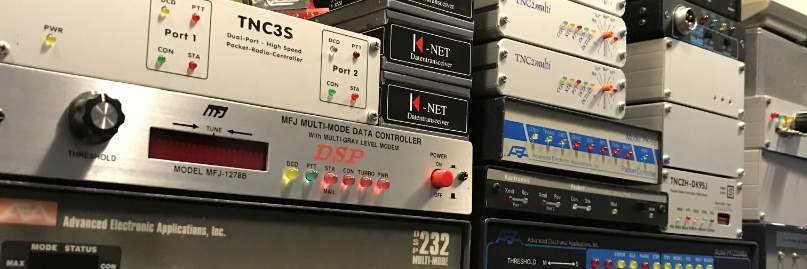
Now I came across some pictures of a Dutch Radio Amateur who own and build the NinoTNC.


Impressive……
Packet-radio A Way Of Life
A while ago I wrote something about the NinoTNC.
There are some Dutch Radio amateurs who have ordered them.
Now I came across some pictures of a Dutch Radio Amateur who own and build the NinoTNC.
Impressive……
Today I made a comparison between Direwolf and a KPC9612. Now I have to say that it is difficult to compare. As the first set I use a KPC9612 and a Yaesu 7900 with an x30 as antenna and as software PinPoint Aprs Client for Windows. As the second set I use a Realistic pro 2006 scanner with an x50 as antenna and Direwolf. These antennas are at the same height.
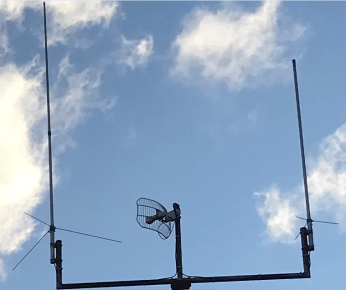
Now I am very impressed with Direwolf, it seems that my KPC9612 is completely deaf. I clearly hear the packet signal but there is no decode. Unfortunately I don’t have two the same sets and two the same antennas to make the comparison better. But it is very clear here that Direwolf wins big.
Below you can see the difference between the setups. The Communication monitor is from PinPoint Aprs Client, the rest is from direwolf and some aprs parsing.
Okay, I know the comparison isn’t entirely fair. But for me Direwolf is the big winner.


I was playing with uiview32, but I was very bothered by the map that comes with uiview32. So I went looking for another Aprs client for windows. I ended up at PinPoint. In PinPoint you can choose from 40 different Map providers. Very nice.

I am satisfied with how it works. It is clear and fast. Only found out if at “Tools> Options” something changes you have to close the program and restart. There is also something disturbing, if you close the program and restart you have lost the received aprs messages. Very annoying.


Please use the latest version, this prevents irritation and annoying things that you do not understand.
Ax25-Apps
-rw-r–r– 1 pd9q pd9q 185677 Mar 8 14:25 ax25-apps-0.0.1.tar.gz
-rw-r–r– 1 pd9q pd9q 196284 Mar 8 14:25 ax25-apps-0.0.2.tar.gz
-rw-r–r– 1 pd9q pd9q 197901 Mar 8 14:25 ax25-apps-0.0.3.tar.gz
-rw-r–r– 1 pd9q pd9q 198064 Mar 8 14:25 ax25-apps-0.0.4.tar.gz
-rw-r–r– 1 pd9q pd9q 207347 Mar 8 14:25 ax25-apps-0.0.5p2.tar.gz
-rw-r–r– 1 pd9q pd9q 207624 Mar 8 14:25 ax25-apps-0.0.5.tar.gz
-rw-r–r– 1 pd9q pd9q 273846 Mar 8 14:25 ax25-apps-0.0.6.tar.gz
-rw-r–r– 1 pd9q pd9q 462058 Mar 8 14:25 ax25-apps-0.0.8-rc1.tar.gz
-rw-r–r– 1 pd9q pd9q 430456 Mar 8 14:25 ax25-apps-0.0.8-rc2.tar.gz
-rw-r–r– 1 pd9q pd9q 469313 Mar 8 14:25 ax25-apps-0.0.8-rc3.tar.gz
-rw-r–r– 1 pd9q pd9q 442172 Mar 8 14:25 ax25-apps-0.0.8-rc4.tar.gz
-rw-r–r– 1 pd9q pd9q 479590 Mar 8 14:25 ax25-apps-0.0.8-rc5.tar.gz
Ax25-Tools
-rw-r–r– 1 pd9q pd9q 515474 Mar 8 14:25 ax25-tools-0.0.10-rc1.tar.gz
-rw-r–r– 1 pd9q pd9q 381575 Mar 8 14:25 ax25-tools-0.0.10-rc2.tar.gz
-rw-r–r– 1 pd9q pd9q 370079 Mar 8 14:25 ax25-tools-0.0.10-rc3.tar.gz
-rw-r–r– 1 pd9q pd9q 364332 Mar 8 14:25 ax25-tools-0.0.10-rc4.tar.gz
-rw-r–r– 1 pd9q pd9q 372851 Mar 8 14:25 ax25-tools-0.0.10-rc5.tar.gz
-rw-r–r– 1 pd9q pd9q 162320 Mar 8 14:25 ax25-tools-0.0.1.tar.gz
-rw-r–r– 1 pd9q pd9q 176989 Mar 8 14:25 ax25-tools-0.0.2.tar.gz
-rw-r–r– 1 pd9q pd9q 234032 Mar 8 14:25 ax25-tools-0.0.3.tar.gz
-rw-r–r– 1 pd9q pd9q 230243 Mar 8 14:25 ax25-tools-0.0.4.tar.gz
-rw-r–r– 1 pd9q pd9q 230243 Mar 8 14:25 ax25-tools-0.0.5.tar.gz
-rw-r–r– 1 pd9q pd9q 251941 Mar 8 14:25 ax25-tools-0.0.6.tar.gz
-rw-r–r– 1 pd9q pd9q 254019 Mar 8 14:25 ax25-tools-0.0.8.tar.gz
Libax25
-rw-r–r– 1 pd9q pd9q 103151 Mar 8 14:25 ax25-lib-0.0.1.tar.gz
-rw-r–r– 1 pd9q pd9q 122941 Mar 8 14:25 ax25-lib-0.0.2.tar.gz
-rw-r–r– 1 pd9q pd9q 123970 Mar 8 14:25 ax25-lib-0.0.3.tar.gz
-rw-r–r– 1 pd9q pd9q 143265 Mar 8 14:25 libax25-0.0.10.tar.gz
-rw-r–r– 1 pd9q pd9q 231325 Mar 8 14:25 libax25-0.0.11.tar.gz
-rw-r–r– 1 pd9q pd9q 361613 Mar 8 14:25 libax25-0.0.12-rc1.tar.gz
-rw-r–r– 1 pd9q pd9q 332178 Mar 8 14:25 libax25-0.0.12-rc2.tar.gz
-rw-r–r– 1 pd9q pd9q 359045 Mar 8 14:25 libax25-0.0.12-rc3.tar.gz
-rw-r–r– 1 pd9q pd9q 335535 Mar 8 14:25 libax25-0.0.12-rc4.tar.gz
-rw-r–r– 1 pd9q pd9q 360123 Mar 8 14:25 libax25-0.0.12-rc5.tar.gz
-rw-r–r– 1 pd9q pd9q 122442 Mar 8 14:25 libax25-0.0.4.tar.gz
-rw-r–r– 1 pd9q pd9q 129510 Mar 8 14:25 libax25-0.0.5.tar.gz
-rw-r–r– 1 pd9q pd9q 130198 Mar 8 14:25 libax25-0.0.6.tar.gz
-rw-r–r– 1 pd9q pd9q 131177 Mar 8 14:25 libax25-0.0.7.tar.gz
-rw-r–r– 1 pd9q pd9q 264673 Mar 8 14:25 libax25-0.0.9.tar.gz
Ax25-Utils
-rw-r–r– 1 pd9q pd9q 282655 Mar 8 14:25 ax25-utils-1.3.30.tar.gz
-rw-r–r– 1 pd9q pd9q 155821 Mar 8 14:25 ax25-utils-1.3.80.tar.gz
-rw-r–r– 1 pd9q pd9q 246854 Mar 8 14:25 ax25-utils-2.0.12c.tar.gz
-rw-r–r– 1 pd9q pd9q 204439 Mar 8 14:25 ax25-utils-2.0.12.tar.gz
-rw-r–r– 1 pd9q pd9q 359082 Mar 8 14:25 ax25-utils-2.1.22b.tar.gz
-rw-r–r– 1 pd9q pd9q 346153 Mar 8 14:25 ax25-utils-2.1.42a.tar.gz
-rw-r–r– 1 pd9q pd9q 344332 Mar 8 14:25 ax25-utils-2.1.42.tar.gz
-rw-r–r– 1 pd9q pd9q 21657 Mar 8 14:25 ax25utils.tar.gz
Brian N1URO, has released Uronode 2.11 (Mar 03, 2020)
Changelog
03/03/2020 v2.11
Changed node.h to reflect current version.

Note: The system has been behaving as best as it can be expected considering
it`s a front-end to the linux protocol stacks. As long as there can be an
ax# or sp# interface, it can attach to it and work the protocol(s) the user
wishes to use. There`s still the 2-line patch that the kernel maintainers
need to add to ax25.ko so that netrom will continue to properly function
however that`s not the issue of URONode, it`s the kernel ax25 module.

Made a couple of changes in gateway.c where the color schema wasn`t properly
resetting the netrom prompt only in regards to aborting ping or a connect
request. This is now fixed.

Made changes in system.c where it wasn`t displaying the user being on IPv6
properly. While at it, I changed how it handles the user when they`re on
IPv4 in the lastlog and loggedin databases.

Changed user.c to reflect incoming session is via IPv6 which also fixes the
output of nodeusers so that instead of displaying ??????? it now shows that
Telnet6 is being used as the incoming protocol. This one was really getting
under my skin. Now I can rest in peace (as per QST 2/2020 haha!)

----------- Note on SystemD --------
In uronode.socket, you`ll notice the line:
ListenStream=0.0.0.0:3694
This tells SystemD to listen on TCP socket 3694 for any IPv4 ONLY incoming
connection. If you wish to filter JUST your amprnet and IPv4 localhost
IPs make a line for each changing 0.0.0.0 to 127.0.0.1 and another for
your amprnet IP. This will by default filter any commercial IP requests
to URONode. If you want SystemD to try IPv6 *first*, don`t enter in any
IP schemas and just list the port number. SystemD by default appears to
use IPv6 prior to IPv4.

You can verify the above by running systemctl status uronode.socket:
systemctl status uronode.socket
● uronode.socket - URONode Server Activation Socket
   Loaded: loaded (/usr/lib/systemd/system/uronode.socket; enabled)
   Active: active (listening) since Mon 2016-03-07 15:30:39 EST; 6min ago
   Listen: 0.0.0.0:3694 (Stream)
 Accepted: 3; Connected: 1

----------- Wish-list: -----------
----------------------------------
Original Development Information (aka Disclaimer): URONode was developed
on an IBM eSeries 330 eServer with dual 1.2GHz CPUs The OS is Debian
Linux 4 using kernel 2.4.27, libax25 v0.0.11, ax25-tools v0.0.8 and
ax25-apps v0.0.6. This software comes with absolutely NO guarantees so
crash n burn at your own risk. We all may be surprised and find out that
it actually DOES something useful! URONode may not run 100% depending on
environmental conditions specific to your system.

URONode is GLPv2 code, and tested by it`s main author on the following
platforms: Raspberry Pi ver. B, Debian 7.7 on a Core-i3, Ubuntu
12.0.4LTS on a Core-i3, Fedora ver. 21
https://ham.packet-radio.net/packet/uronode/uronode-2.11.tar.gz
Source Link
Some tnc terminals of the tnc that I use.


Jimmy K3CHB, Was looking at how he could get a restart option in Jnos in combination with “screen”.
Below how he did it.
Startnos
#!/bin/bash
echo "Starting [JNOS-2.0n.beta-IHM$]"
screen -d -m -S jnos-console ./nos.loop exit 0
Nos.loop
#!/bin/bash
# JNOS 2.0 Loop script by K3CHB

exit_code=-1
killall -KILL jnos 2> /dev/null

while [ $exit_code -ne 0 ]
do
     cd /jnos
     rm -f /jnos/spool/mqueue/*.lck 2> /dev/null
     rm -f /jnos/spool/mail/*.lck 2> /dev/null
     rm -f /jnos/spool/ptmx_direwolf.cfg 2> /dev/null
     sleep 2
     grep -o "/dev/pts/." /jnos/direwolf.log > /jnos/spool/ptmx_direwolf.cfg
     sleep 2
     export TZ=EST5EDT
     export TERM=xterm-color
     /jnos/jnos -g2 -i -d/jnos && exit_code=0
done

exit 0

Autoexec.nos
start snmpd
snmp ro pd9q 192.168.79.
sudo apt-get install mrtg
mkdir /var/www/html/mrtg/jnos
cd /var/www/html/mrtg/jnos
sudo nano mrtg.cfg
Mrtg.cfg
#
WorkDir: /var/www/html/mrtg/jnos
#
options[_]: noinfo,nobanner,growright,logscale
XSize[_]: 300
YSize[_]: 100
#
EnableIPv6: no
NoMib2: yes
#
# JNOS tun0 (3) interface
#
Target[tun0]: 3:pd9q@192.168.79.110:
MaxBytes[tun0]: 1000000
PNGTitle[tun0]: Internet and some LAN traffic
Title[tun0]: tun0
#
# JNOS axu0 (2) interface
#
Target[axu0]: 2:pd9q@192.168.79.110:
MaxBytes[axu0]: 1000000
PNGTitle[axu0]: axu0
Title[axu0]: axu0
#
# JNOS hf (1) interface
#
Target[ax0]: 1:pd9q@192.168.79.110:
MaxBytes[ax0]: 50
PNGTitle[ax0]: 144.850Mhz @ 1200 Baud
Title[ax0]: ax0
#
# JNOS netrom (0) interface
#
Target[netrom]: 0:pd9q@192.168.79.110:
MaxBytes[netrom]: 50
PNGTitle[netrom]: Netrom (excluding RIF frames)
Title[netrom]: netrom
#
sudo indexmaker --output index.html -section=title --show=day --columns=1 mrtg.cfg
sudo nano /etc/cron.d/mrtg
*/5 * * * * root if [ -x /usr/bin/mrtg ] && [ -r /var/www/html/mrtg/jnos/mrtg.cfg ] && [ -d "$(grep '^[[:space:]]*[^#]*[[:space:]]*W$


 Linux-ax25.org git repositories.
You must be logged in to post a comment.