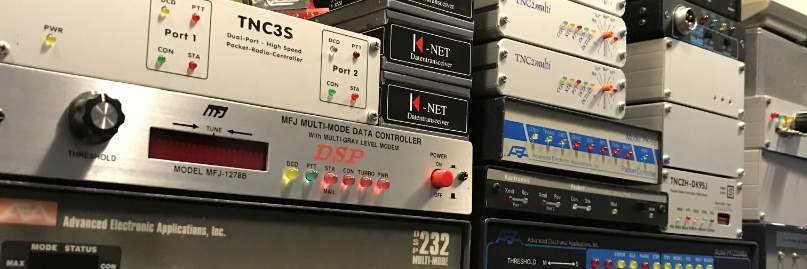
Direwolf 1.6 D (Mar 1 2020) FX.25

I did some testing with a friend of mine PD2NLX. We have tested the (new) FX.25 protocol (32 and 16 Bytes) This is AX25 with forward error correction. Now the distance between us is quite short, about 5 kilometers. We have discovered that the 16 bytes check at a short distance works better.

First I have installed the “dev” release of Direwolf.

git clone https://github.com/wb2osz/direwolf.git
cd direwolf
git branch -r
git checkout dev
mkdir build && cd build
cmake ..
make -j4
sudo make install
make install-conf

My direwolf.start file look like this

#Start direwolf with -X (16, 32, 64) option to enable FX.25 tx. Number (16, 32, 64) means bytes to check
direwolf -X 16 -d x -t 0 -c /home/pd9q/jnos/direwolf.conf -l /home/pd9q/jnos/logs/direwolf >/dev/tty3

I have add the start option “-d x” Let’s take a look at what that looks like.

FX.25: Matched correlation tag 0x05 with 6 bit errors.  Expecting 223 data & 32 check bytes.
FX.25: Matched correlation tag 0x05 with 0 bit errors.  Expecting 223 data & 32 check bytes.
FX.25: FEC complete with no errors.
FX.25: FEC complete, fixed 13 errors in byte positions: 11 19 65 73 74 92 116 117
132 138 143 144 192

FX.25: Matched correlation tag 0x06 with 1 bit errors.  Expecting 128 data & 32 check bytes.
FX.25: FEC complete with no errors.
FX.25: FEC complete, fixed  1 errors in byte positions: 97

FX.25: Matched correlation tag 0x04 with 0 bit errors.  Expecting 32 data & 16 check bytes.
FX.25: FEC complete, fixed  1 errors in byte positions: 248
FX.25: FEC complete with no errors.

FX.25: Matched correlation tag 0x01 with 0 bit errors.  Expecting 239 data & 16 check bytes.
FX.25: FEC complete with no errors.

It has, of course, been developed to work over large distances and thus achieve a reasonably reliable connection. But it works surprisingly well.

Guide…BPQ User and Sysop Commands

Bill PY2BIL has wrote a great guide with Sysop and User commands.

PY2BIL wrote,

Since I started with my BPQ BBS I was looking for an easier way to access the documentation and find what I needed at the moment, so as many do, I wrote down what I used the most along the way. Recently I decided to take the plunge and write the ‘Official BPQ Cheat Sheet’ (hihi) based on the official documentation that would make my life easier. Some of the commands I found in the documentation are flagged as obsolete or no other reference was found and I suspect that many changes that John did are still not formally documented and may be laying around in this forum.

The official website,

https://cheatography.com/gcremerius/cheat-sheets/bpq-user-and-sysop-commands/

Or download it from this link.

https://ham.packet-radio.net/packet/bpq32/bpq32-guide/bpq-user-and-sysop-commands.pdf

Thanks Bill great document.

Jnos NNTP(s) Server

Jean VE2PKT helpt me to get things going. Thank you Jean. I really appreciate it.

I first have to compile a new Jnos version with the NNTP(s) enabled, edit your config.h and define NNTPS.
(#define NNTPS   /* Netnews client and server */)
I had problems if I wanted to connect the NNTP server. Jnos crached right away. After a distro update of my linux version from “Stretch” to “Buster” all went fine.

Autoexec.nos

# NNTP server/client
start nntp
nntp profile fullname "Niels PD9Q"
nntp profile host jnos.packet-radio.nl
nntp profile organ "Amateur Radio"
nntp profile reply pd9q@jnos.packet-radio.nl
nntp profile user pd9q
#
nntp access off
nntp firstpoll 5
nntp ihave 0
nntp lzw on
nntp quiet 2

Fist create newsgroups on the Jnos prompt

jnos>
jnos> nntp create ng.bpq y
jnos>

nntp create <news.group.name> [y|n]

Updates the /spool/news/active file, which must have an entry for each news group you wish to receive.  Choose y to permit posting to this group, or n to deny posting.  y is assumed if nothing is specified.  The /spool/news/pointer file is also updated with the path to the directory which will contain the articles. Articles will be stored as separate files, named by an integer corresponding to their arrival order.

The NNTPS software includes a mail-to-news feature, such that email with a To: address that begins with “!” is passed to the NNTPS module.  The remainder of the To: address is interpreted as a newsgroup name, with the name truncated at the first occurrence of one of “%@.,/”, and with “!” translated to “.” and “+” to “,”. An alias is usually used to provide this special name. For example, to route all NLD bulletins to both the NLD area, and the NG.NLD newsgroup, use the alias:

/jnos/alias
#News groups
nld     nld     !ng!nld

My alias file looks like this
nld     nld     !ng!nld
bpq     bpq     !ng!bpq
7plus   7plus   !ng!7plus
ww      ww      !ng!ww
eu      eu      !ng!eu
aprs    aprs    !ng!aprs
local   local   !ng!local
prop    prop    !ng!prop

The NNTPS software includes a news-to-mail feature, such that news articles can be emailed to local or remote destinations after they are processed by nntp. This would allow, for example, emailing to a public area, so that BBS users too could read news articles. JNOS must be compiled with NNTPS and NEWS_TO_MAIL #define’d and a file /spool/news/gateway must exist to define the mapping from a newsgroup to an SMTP To: address. Each non-comment line in the gateway file must begin with a newsgroup name (starnames OK), followed by spaces or tabs, followed by the email To: address.

/jnos/spool/news/gateway
ng.nld  aprs@nld
ng.nld  prop@nld
ng.nld  all@nld
ng.nld  7plus@nld
ng.7plus        all@7plus
ng.ww   all@ww
ng.eu   all@eu
ng.local        all@local
ng.bpq  all@bpq

Expire time of bulletins or newsgroup messages.

/jnos/spool/expire.dat
# bulletins received from AX25 network
#
nld 90
bpq 60
7plus 30
eu 30
check 45
ww 30
prop
#
#  NNTP
!ng.nld 90
!ng.bpq 60
!ng.7plus 30
!ng.check 30
!ng.eu 30
!ng.prop 30
!ng.ww 30

I’m using Thunderbird to read and post messages as bulletin and newsgroup mail.

mail.log

Fri Feb 21 20:22:46 2020 queue job 2333 To: !ng!local From: pd9q@jnos.packet-radio.nl
Fri Feb 21 20:22:46 2020 queue job 2333 To: local From: pd9q@jnos.packet-radio.nl
Fri Feb 21 20:26:50 2020 deliver Msg-Id: 2335@jnos.packet-radio.nl To: local From: pd9q@jnos.packet-radio.nl Subject: Test ng.local
Received: by jnos.packet-radio.nl with NNTP
        id AA2332 ; Fri, 21 Feb 2020 20:22:46 CET
Newsgroups: ng.local
From: Niels PD9Q <pd9q@jnos.packet-radio.nl
Subject: Test ng.local
Message-ID: <2331@jnos.packet-radio.nl>
Date: Fri, 21 Feb 2020 20:22:41 +0100
Errors-To:  sysop
To: all@local

Test the ng.local newsgroup.
Newsgroups: ng.local
X-Mozilla-News-Host: news://192.168.1.101:119
From: Niels PD9Q <pd9q@jnos.packet-radio.nl>
Path: jnos.packet-radio.nl!not-for-mail
Subject: Test ng.local
Message-ID: <2331@jnos.packet-radio.nl>
Date: Fri, 21 Feb 2020 20:22:41 +0100
User-Agent: Thunderbird/60.9.1
MIME-Version: 1.0
Content-Type: text/plain; charset=utf-8; format=flowed
Content-Language: nl
Content-Transfer-Encoding: 7bit
Lines: 1

Test the ng.local newsgroup.
Path: jnos.packet-radio.nl!NNTP_GATE@jnos.packet-radio.nl!jnos
From: pd9q@jnos.packet-radio.nl
Newsgroups: ng.local
Subject: Test all@local
Message-ID: <c00aaec4-9b7f-b803-b9cd-adc1941ba8b9@jnos.packet-radio.nl>
Sender: NNTP@jnos.packet-radio.nl
Comments: Article created from mail
X-Mozilla-News-Host: news://192.168.1.101:119
To: all@local
Date: Fri, 21 Feb 2020 20:53:28 +0100
User-Agent: Thunderbird/60.9.1
MIME-Version: 1.0
Content-Type: text/plain; charset=utf-8; format=flowed
Content-Language: nl
Content-Transfer-Encoding: 7bit

Test all@local bulletin

73 Niels

That’s look pretty cool, isn’t it?


Jnos colors are back

For the Raspberry Pi users among us, Maiko has found a solution for the Colors in Jnos and the NNTP server and probably even more stability issues.
For a long time we had to miss the colors, but I immediately imagine myself back in the 90s.

The Solution…..

JNOS is doing strange things on PI platforms. Because gcc in the ARM processors are forcing CHAR variables to be UNSIGNED, not SIGNED!

Until I find a better solution (long term), you must add :

     -fsigned-char

to the CFLAGS in the makefile.

CFLAGS = -DUNIX $(DEBUG) $(PATCHES) $(WARNINGS) -fsigned-char
make clean
./configure
make

Thank you Maiko….

Jnos White Page (WP) Support

Jnos White Page processing.

Create a directory /jnos/spool/wp

This directory consists the following files.
1. wpages                                                                   # links a user call to a bbs call.
2. wpagebbs                                                               # contains the full hierarchical address of a bbs call.
3. wpages.new, wpagebbs.new, wpages.tmp            # new entries waiting to be merged into the above (MAIN) files during processing.
4. update.wp                                                              # tracks updates to our database – used for sending white page updates to other systems.

Autoexec.nos

# WP Database
wp age 0			# number of days after which white page entries expire - default 30 days.
wp client on			# turn this on to allow WP lookup at the bbs prompt 
wp server on			# treat incoming WP bulletins (wp@ww) as updates to the white page database - default is off.
wp destinations pi8lap		# use the wp destinations console command to specify the systems you want updates sent to
wp timer 60			# interval at which JNOS processes the white page database - default is 0 (never)
wp support on			# turn on or off (completely) the use the white page database - default is on
wp temporaryage 30		# number of days an entry has to wait in the wpages.tmp file before it can be merged into the main files.
wp update 60			# interval at which JNOS should do the update runs - default is 0 (never)

Rewrite

# Handle wp messages
wp@ww					whitepages
wp@eu					whitepages
wp@pd9q					whitepages
wp@pd9q.#zl.nld.eu		whitepages
#
*@pd9q.#zl.nld.eu pd9q

How SP command interacts with WP database.

By default, there is no WP prompt. You have to create a preference before any WP interaction occurs when using the ‘SP’ command to send a message.
Use ‘XW’ (without arguments) to display current setting, for example :

WP options for ‘SP’ – 1=disable, 2=show/prompt, 3=show/noprompt, 4=force it
option 2 is currently set

To set your option, simply do something like ‘xw 2’, that’s all there is to it.

If you enter the command ‘wp pd9q’ and you might get this below :

wp routing ‘PD9Q@PD9Q.#ZL.NLD.EU

If I enter ‘sp pd9q’ on my system, I might be prompted like below :

wp routing ‘PD9Q@PD9Q.#ZL.NLD.EU’ – use ? (Y/n)

Bug Netrom node Broadcast

@Bug Bash / Thanks to Dave who has fixed the bug (also working on Xfbb) Thanks to Theo how has found the Bug.

There is an (apparently) very old bug in netromd of the linuxax25 tools. This bug ensures that nodes broadcasts on an AX.25 port with paclen <256 do not go out or are incomplete. This is the case in both the original and VE7FET versions.

Syslog get spammend with this kind of messages

Feb  6 14:20:03 raspberrypi netromd[17311]: netromt: sendto: Message too long
Feb  6 14:20:08 raspberrypi netromd[17311]: netromt: sendto: Message too long
Feb  6 14:20:13 raspberrypi netromd[17311]: netromt: sendto: Message too long
Feb  6 14:20:18 raspberrypi netromd[17311]: netromt: sendto: Message too long
Feb  6 14:20:23 raspberrypi netromd[17311]: netromt: sendto: Message too long
Feb  6 14:20:28 raspberrypi netromd[17311]: netromt: sendto: Message too long
Feb  6 14:20:33 raspberrypi netromd[17311]: netromt: sendto: Message too long
Feb  6 14:20:38 raspberrypi netromd[17311]: netromt: sendto: Message too long
Feb  6 14:20:43 raspberrypi netromd[17311]: netromt: sendto: Message too long
Feb  6 14:35:04 raspberrypi netromd[17320]: netromt: sendto: Message too long
Feb  6 14:35:09 raspberrypi netromd[17320]: netromt: sendto: Message too long
Feb  6 14:35:14 raspberrypi netromd[17320]: netromt: sendto: Message too long
Feb  6 14:35:19 raspberrypi netromd[17320]: netromt: sendto: Message too long

This can be fixed by releasing a patch on the ax25tools/netrom/netromt.c file.

106c106,111
< 
---
> 	int ax_paclen;
> 	
> 	ax_paclen = ax25_config_get_paclen (port_list[port].port);
> 	if (ax_paclen == 0) 
> 		ax_paclen = NODES_PACLEN;	
> 	
183,184c188,189
< 			if (len + ROUTE_LEN > NODES_PACLEN)
< 				break;
---
> 			if (len + ROUTE_LEN > ax_paclen)
> 				break;	
197,198c202,203
< 	/* If the packet was not full then we are done */
< 	} while (len + ROUTE_LEN > NODES_PACLEN);
---
> 	/* If the packet was not full then we are done */	
> 	} while (len + ROUTE_LEN > ax_paclen);

Download the patch

FBB Extensions to YAPP-protocol

These extensions are used in TPK 1.65a (and up) and FBB 5.14 and up.

HEADER extension.

 The header now carries the DATE and TIME of the file being transmitted.
[SOH] [Len] [Filename] [NUL] [File Size] [NUL] [Date] [Time] [NUL]

 The Date and Time are the values reported by DOS, coded in 4 hexadecimal
digits and are sent in ASCII (8 characters).

 The receiver has the choice of using either extended Yapp with checksum or
normal Yapp.

 The normal Yapp reply is RF, as before and the receiver can keep the date
and time information .

 The extended Yapp reply is : RT  Receive_TPK  and is coded : [ACK] [ACK]

 If the receiver reply is RT the protocol used will be what I have called
YappC for Yapp with checksum. When the sender gets this packet he MUST use
YappC.

Data Packets extension.

 If the receivers reply is RT the protocol used will be YappC. The checksum
allows detection of packets corrupted along the link, particularly on the
RS232 lines where there is no error control or correction (or it's very
poor!)

Data packets : [STX] [Len] [Data] [Checksum]

 Checksum is the sum of all data bytes anded with FF in 8 bits like Xmodem.

 If the checksum is bad then the receiver must send a Cancel and enters CW
state.

Crash Recovery.

 A new field has been added to the resume reply to tell the sender if the
receiver can use YappC or not. Resume is sent instead of RF (or RT).

 Resume reply for Yapp: (as used before by TPK and FBB)

    [NAK] [Len] [R] [NUL] [Received Length] [NUL]
            I    I                I
            I    I                +-- in ASCII as in the header
            I    +-- as Resume !
            I
            +------- len of the following bytes

Resume reply for YappC:

    [NAK] [Len] [R] [NUL] [Received Length] [NUL] [C] [NUL]
                                                   I
                 Tells sender I can use YappC -----+

 When the sender gets this packet then he must also use YappC.

FBB Unproto message lists

 FBB software allows sending unproto lists of message. This is validated
separately on each port (letter L in PORT.SYS). Unproto address is FBB with
the following header :

fm F6FBB-1 to FBB ctl UI

 An unproto list line is sent on every validated port each time a message is
recorded. The line is in the form :

12345 B 2053 TEST@ALL F6FBB 920325 This is the subject

 If a message number is missing or does not exist the line will be :

12346 #

 This allows a system listening to the UI packets on a frequency to create a
list identical to the one of the BBS, and then the user will not have to
connect the BBS to know the list of messages and bulletins.

 A control can be done on the number of the messages to check if a line is
missing.

 If the remote system receives a new line, and a line is missing, it only has
to send an unproto frame addressed to the BBS callsign like this :

fm FC1EBN-3 to F6FBB-1 ctl UI
? 00002EE00E

 This will be taken in account only if the user has the U flag validated (EU
command).

 If the user has not his flag validated in the BBS, he will receive a line
like :

fm F6FBB-1 to FBB ctl UI
12200 / callsign

 In this case, the the remote software MUST stop asking unprotoes.

 The first 8 digits are the hexadecimal number of the requested start of the
list (here 00002EE0 -> 12000) and the last two digits are the sum of the four
bytes anded with FF (0E).

 The BBS will then starts sending lines from the requested number up to the
last message number.

 If the number requested seems to be too far from the current line, the BBS
can readjust the request of "callsign" while sending :

fm F6FBB-1 to FBB ctl UI
12200 ! CALLSIGN
12201 B 2040    TEST@FRA    F6FBB  920325 This is a bulletin
12202 #
12203 P 206    F6ABJ@F6ABJ  F6FBB  920325 Hello Remy.
etc...

and then starts sending lines from 12201. The remote system must change its
base number to 12201.

  If the number requested is greater than the last message received in the
BBS, the BBS will send a line like :

 12300 !!

 This indicates that the list in the remote system is up to date. The last
received message in the BBS is 12300.


 The remote system can also connect the BBS and ask for messages in binary
compressed mode using the following sequence :


     BBS                                    Remote system
--------------------------------------------------------------------------
                                            Connection request
Connection.

[FBB-5.14-ABFHM$]
Welcome in Toulouse, Gerard.
F6FBB BBS>
                                            [TPK-1.80-$]
1>
                                            F< #Msg
Binary compressed message #Msg
is sent using format described
in appendix 7
1>
                                            Disconnect.

 From TPK version 1.80 (packet communication program developed by FC1EBN),
this protocol is implemented.

FBB PG programs

PG programs development.

 PG programs are in the PG subdirectory. They are small programs allowing
interactivity with the user.

 COM or EXE programs can be called.

 PG programs must be little as the amount of memory is limited and fast
because the multitasking is stopped during its activity.

 To run a PG program and start a session, the user must type the command PG
followed by the name of the program. The PG command alone gives the content
of the PG subdirectory. The PG program is particularly developed for FBB
software but can be an interface to a standard program.

 Each time a complete line (up to the return character) is received, the PG
program is called with some arguments including a level number. This number
is incremented each time the program is called in the same PG session. The
first time the level number will be 0.

 The line arguments given to the PG program are :

- Callsign (format as F6FBB-8).
- Level number (0 is the first time, up to 99).
- Flags of the user (binary number as user`s mask of INIT.SRV).
- Record number of the user in INF.SYS.
- Received data (each word is a new argument).

 The PG program ends with an exit value. This value is very important and
tells the BBS what to do :

 0 : end of session and return to the BBS menu.
 1 : the program will be called again and the level number is incremented.
 2 : the user will be disconnected.
 3 : the receive data will be sent as a BBS command and return to BBS.
 4 : the receive data will be sent as a BBS command, level incremented.
 5 : the program will be called again, but the level is not incremented.

 The data sent by the PG program to the standard output will be sent to the
user. This allows a real interactivity between the user and the PG program.

  Here is an example of a small program :

/*
 * TST_PG.C
 *
 * Little test program of "PG" command for FBB BBS software.
 *
 * (C) F6FBB 1991.
 *
 * FBB software 5.14 and up.
 *
 *
 * This program echoes to the user what he types
 * or executes a BBS command preceded by "CMD"
 * until "BYE" is received
 */

#include <stdio.h>

main(int argc, char **argv)
{
  int  i;
  int  level = atoi(argv[2]);        /* Get level from argument list   */

                                     /* and transform it to integer    */
  if (level == 0) {                  /* Is level equal to 0 ?          */
                                     /* This is the first call         */
    printf("Hello %s, type BYE when you want to stop !\n", argv[1]);
    return(1);                       /* program will be called again   */
  }
  else {
    strupr(argv[5]);                 /* Capitalise the first word      */
    if (strcmp(argv[5], "BYE") == 0) {       /* is BYE received ?      */
      printf("Ok, bye-bye\n");
      return(0);                     /* Yes, go on BBS                 */
    }
    else if (strcmp(argv[5], "CMD") == 0) {  /* is CMD received ?      */
      for (i = 6 ; i < argc ; i++)   /* List line arguments            */
      printf("%s ", argv[i]);        /* sent by user                   */
      putchar('\n');
      for (i = 6 ; i < argc ; i++)   /* List line arguments            */
        printf("%s ", argv[i]);      /* sent by user                   */
      putchar('\n');
      return(4);                     /* Yes, send command              */
    }
    else {
      printf("You told me : ");      /* These are other lines          */
      for (i = 5 ; i < argc ; i++)   /* List line arguments            */
      printf("%s ", argv[i]);        /* sent by user                   */
      putchar('\n');
      return(1);                     /* No, call again program         */
    }
  }
}

FBB Message filtering

 FBB software allows filtering messages. Filtering is not done by the BBS
software but by external programs developed by users.

 When the BBS starts, the M_FILTER does not really need to be there.  But at
the first message, it must exist.  If it does not exist at THAT time, it will
not be checked again.  So if a M_FILTER is added after that, the BBS must be
rebooted for the filter to take effect.

M_FILTER may be interactive and allows to incorporate some features like 
dedicated information for predefined callsigns, password filtering, etc...

 I did not develop such programs, but this is an open door to many
applications.

 The M_FILTER program must be found by the PATH of MsDos. Its extension can
be COM or EXE, and it must be little and fast as multitasking is stopped
during the activity of this program. If this program is not found, it will
not be called until the BBS is rebooted.

 The M_FILTER may also be created as a DLL.  Both for WinFBB and DosFBB (!!).
The filter must be installed in the path (\FBB\BIN) of Dos.

 The message filter is called (if found) each time a message is ready to be
recorded (when Ctrl Z or /EX is received). The decision to validate or not
the message is function of the exit value of the M_FILTER program.

 The M_FILTER program (if found) is called with some arguments including a
level number. This number is incremented each time the program is called in
the same connection session. The first time the level number will be 0.

 The line arguments given to the M_FILTER program are :

- File name including the text of the message.
- Type of the message (P, B, T).
- Sender.
- "To" field.
- Record number of DIRMES.SYS file.

 The M_FILTER program ends with an exit value. This value is very important
and tells the BBS what to do :

 0 : Message is recorded.
 1 : Message is killed   (status = K).
 2 : Message is archived (status = A).
 3 : Message is held     (status = H).


/*
 * M_FILTER.C
 *
 * The message filter MUST be named M_FILTER (COM or EXE).
 *
 * This example only writes its call arguments in the TEST.MES file.
 *
 * It is called with 5 arguments :
 *   File name of the message.
 *   Type .
 *   Sender.
 *   To.
 *   Number of the record in the DIRMES.SYS file.
 *
 * If it returns 0 : The message is accepted.
 *               1 : The message is killed (status K).
 *               2 : The message is archived (status A).
 *
 */

#include <stdio.h>
main(argc, argv)
int  argc;
char **argv;
{
  int  i;
  FILE * fptr = fopen("TEST.MES", "at");

  for (i = 0 ; i < argc ; fprintf(fptr, "%s ", argv[i++]));
  fputc('\n', fptr);

  fclose(fptr);

  return(0);
}