Ax25-tools > ax25-tools-0.0.10-rc4.tar
Ax25-apps > ax25-apps-0.0.8-rc4.tar
LibAx25 > libax25-0.0.12-rc4.tar
Packet-radio A Way Of Life
Ax25-tools > ax25-tools-0.0.10-rc4.tar
Ax25-apps > ax25-apps-0.0.8-rc4.tar
LibAx25 > libax25-0.0.12-rc4.tar

Download PcPakratt > AEA-PK.zip
SoundModem v1.00b changes:
– Added “DW QPSK 2400bd” and “DW 8PSK 4800bd” Direwolf compatible modes.
The carrier frequency must be “1800Hz” (for a full compatibility with Direwolf).
http://uz7.ho.ua/modem_beta/CHANGELOG.txt
http://uz7.ho.ua/modem_beta/user_guide_v045b_EN.pdf
Get the version V1.00b http://uz7.ho.ua/modem_beta/soundmodem100.zip

John WQ6N has found a solution for direwolf and Linbpq that works very well for HF.
Direwolf.conf
/etc/direwolf/direwolf.conf
ADEVICE plughw:1,0
ACHANNELS 1
CHANNEL 0
MODEM 300 2130:2230 D
SERIALKISS /dev/ptyp0 19200
KISSPORT 0
DWAIT 0
SLOTTIME 12
PERSIST 63
TXDELAY 40
TXTAIL 10
FIX_BITS 1 AX25
LOGDIR /var/log/direwolf
bpq32.cfg
/linbpq/bpq32.cfg (HFGW Port)
PORT
PORTNUM=XX                       ; Optional but sets port number if stated
ID=BPQ HFGW                     ; Displayed by PORTS command
TYPE=ASYNC                       ; Port is RS232 Com
PROTOCOL=KISS           ; TNC is used in KISS, JKISS or BPQKISS mode
FULLDUP=0                        ; Only meaningful for KISS, JKISS or BPQKISS devices
COMPORT=/dev/ttyp0
SPEED=19200                      ; RS232 COM PORT SPEED
CHANNEL=A                        ; A for single channel TNC, A or B for multichannel
NOKEEPALIVES=1
PERSIST=63                       ; PERSIST=256/(# of transmitters-1)
SLOTTIME=120            ; CMSA interval timer in milliseconds
TXDELAY=300             ; Transmit keyup delay in milliseconds
TXTAIL=100                       ; TX key down, in milliseconds, at packet end
QUALITY=0               ; Quality factor applied to node broadcasts heard on
MINQUAL=0               ; Entries in the nodes table with qualities greater or
MAXFRAME=1                       ; Max outstanding frames (1 thru 7)
FRACK=5000                       ; Level 2 timout in milliseconds
RESPTIME=1000           ; Level 2 delayed ack timer in milliseconds
RETRIES=15                       ; Level 2 maximum retry value
PACLEN=60                        ; Default max packet length for this port
UNPROTO=<URNODE>             ; BTEXT broadcast addrs format: DEST[,digi1[,digi2]]
BCALL=<URCALL-SSID>            ; BTEXT call. unstated defaults to APPL1CALL
L3ONLY=0                         ; 1=No user downlink connects on this port
DIGIFLAG=0                       ; Digipeat: 0=OFF, 1=ALL, 255=UI Only
DIGIPORT=0                       ; Port on which to send digi'd frames (0 = same port)
USERS=0                 ; Maximum number of L2 sessions, 0 = no limit
ENDPORT
journalctl -o cat -af -u direwolf
Opened /dev/ptyp0 for serial port KISS.
KISS protocol set TXDELAY = 30 (*10mS units = 300 mS), port 0
KISS protocol set Persistence = 63, port 0
KISS protocol set SlotTime = 12 (*10mS units = 120 mS), port 0
KISS protocol set TXtail = 10 (*10mS units = 100 mS), port 0
KISS protocol set FullDuplex = 0, port 0

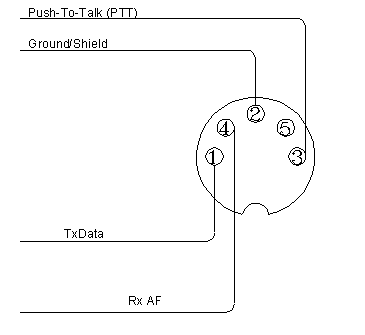
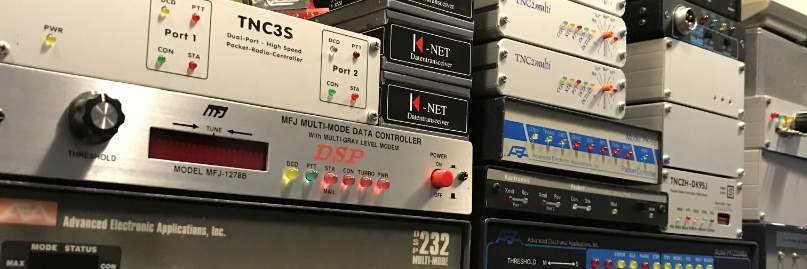
AEA/Timewave TNCs
PK-900 -> Manual -> PK900Man.pdf
PK-900 -> Pinout -> PK900Pins.gif
DSP-2232 -> Manual -> dsp2232-manual.pdf
DSP-2232 -> Pinout -> PK900Pins.gif
PK-232 -> Manual -> PK232MBXman.pdf
PK-232 -> Manual -> PK232MBXnode.pdf
PK-88 -> Manual -> pk-88.pdf

KPC3 -> Manual -> KPC-3P_Manual_ver9B.pdf
KPC3 -> Pinout -> kpc3ppinout.pdf
KPC 9612 -> Manual -> KPC-9612PMX_Manual.pdf
KPC 9612 -> Pinout -> kpc9612pinout.pdf
KAM98 -> Manual -> KAM98_manual.pdf
KAM98 -> Pinout is the same as KPC3
KAM-XL -> Manual -> KAMXL_manual.pdf
KAM-XL -> Pinout -> kamxlpinout.pdf
In the previous post about Direwolf and jnos i use Direwolf-1.3 and does not know about the SERIALKISS port.
John WQ6N point it out to me… Tnx John WQ6N. Nice one.
Read the previous post.
So maybe I wrote that script for nothing. This is working pretty simple 🙂
In Direwolf 1.5-beta is it possible to use SERIALKISS to connect com to com.
I have try to use a PTY pair created with socat.
# Create pty pair
socat -d -d -ly PTY,link=/dev/ttyq1 PTY,link=/dev/ptyq1 &
sleep 2
# Start Direwolf
direwolf -d kn -c /direwolf/direwolf.conf &> /var/log/direwolf.log >/dev/tty3 &
sleep 2

Direwolf.conf
SERIALKISS  /dev/ttyq1 19200

# Jnos autoexec.nos
attach asy ptyq1 - ax25 ax0 4096 256 19200

Fireup Jnos
./jnos -C -g2 -u3 -f nos.cfg -i
I use conspy to look at the output of Direwolf. apt-get install conspy
Use it just like this “conspy 3” The number 3 stands for the tty were Direwolf is running on /dev/tty3.
Hit the escape button a couple of times to exit.
Here is the output of Direwolf
>>> Data frame to KISS client application, port 0, total length = 82
  000:  c0 00 92 88 40 40 40 40 e0 9c 98 70 b4 b4 8a 60  ....@@@@...p...`
  010:  ae 92 88 8a 62 40 63 03 f0 43 6f 6e 6e 65 63 74  ....b@c..Connect
  020:  20 4e 4c 36 5a 5a 45 20 66 6f 72 20 74 68 65 20   PD2LT-6 for the
  030:  4a 4e 4f 53 20 43 6f 6e 76 65 72 73 20 28 6c 69  JNOS Convers (li
  040:  6e 6b 65 64 20 77 69 74 68 20 6f 74 68 65 72 73  nked with others
  050:  29 c0
Ok that is working quit well.
I start Direwolf with the option “-d kn” So you can look at the kiss communication between Direwolf and Jnos.
Some text out of the User-Guide.pdf.
“Up to 3 concurrent TCP KISS client applications are allowed at the same time.
You can raise this limit by increasing the value of MAX_NET_CLIENTS, in source file kissnet.c and recompiling.”
Whoooo thats nice up to 3 (and more) applications can connect to Direwolf on the KISSPORT.
And there is also the AGW and the SERIALKISS port. Men where do I start.
John WQ6N has found something that is useful. He use a Legacy BSD pseudo pair.
There are no Legacy BSD pseudo pairs in Linux any more. But it is possible to create some.
/etc/default/grub:
Change line from:
GRUB_CMDLINE_LINUX=""
to:
GRUB_CMDLINE_LINUX="pty.legacy_count=10"
(Where 10 is the number of pty legacy devices you require.)
This created 10 ptypX/ttypX terminal pairs.
After editing the grub file run the command “update-grub” and reboot.
So now it`s time to set Direwolf and Jnos to use the pty Legacy devices.
The Direwolf SERIALKISS
SERIALKISS /dev/ptyp0 19200

The associated JNOS2 attach line:
attach asy ttyp0 - ax25 hfgw 4096 256 19200
#!/bin/bash
# 6 march 2018
# Wrote a small script to get the shittie PTS to a file where its belongs.
# Yes you can also use the agw driver from Direwolf for Jnos.
# Now its also possible to "sed" the right PTS to your ax25 start file
#
# socat -d -d -lf /tmp/socat.pts PTY,link=/tmp/kisstnc TCP4:127.0.0.1:8001 &
# sleep 2
# grep -o "/dev/pts/." /tmp/socat.pts > /tmp/devs.pts
# attachthem () {
# read PTS1
# sed -i "s,kissattach -m 256 /dev/.*$,kissattach -m 256 $PTS1 ax0 44.137.31.73," /etc/ax25/ax-start
#
# }
#
# tail -n 1 /tmp/devs.pts | attachthem
# rm /tmp/socat.pts
# rm /tmp/devs.pts
# sleep 3
#
# Or use it with (X)net.
# sed -i "s,attach sdev4 kiss 4 1 19200 /dev/.*$,attach sdev4 kiss 4 1 19200 $PTS1," /usr/local/xnet/AUTOBOOT.NET
#
# Or with BPQ
# sed -i "s,COMPORT=/dev/.*$,COMPORT=$PTS1," /usr/local/linbpq/bpq32.cfg
#
# Oo well maybe work this better
# IPADDR=127.0.0.1
# TCPPORT=8001
#
# Yes there are many way`s to do this, but i had some fun to play with it.
# Maybe it is useful for someone.
#################################################################################################
The scipt…. Small but work quit well
#!/bin/bash
echo "Starting direwolf with socat for jnos/ax25"
# Set the path to direwolf and some stuff
PATH=/direwolf:/usr/bin:/bin:/usr/local/bin
# Start Direwolf
direwolf -c /direwolf/direwolf.conf &> /var/log/direwolf.log >/dev/tty3 &
sleep 3
# Socat kisstnc link with a PTS
socat -d -d -lf /tmp/socat.pts PTY,link=/tmp/kisstnc TCP4:127.0.0.1:8001 &
sleep 2
grep -o "/dev/pts/." /tmp/socat.pts > /home/pd2lt/jnos/spool/ptmx_radio.cfg
echo "Direwolf is connect to" `cat /home/pd2lt/jnos/spool/ptmx_radio.cfg`
echo "Now Jnos is ready to Rock and Roll :)"
rm /tmp/socat.pts
# Dont delete ptmx_radio.cfg before starting Jnos
rm /home/pd2lt/jnos/spool/ptmx_radio.cfg
sleep 1
This is what i found in the change.log of Jnos
Better support for PTY98 (/dev/ptmx, /dev/pts/N) pseudo devices. Bob (VE3TOK)
   asked for this a long time ago, so I figured I better get it implemented.

   Note : Technically one can use the new jnos 'attach baycom' and go direct to
   a kernel KISS type interface, meaning you don't need to run an intermediary
   program (kissattach or net2kiss) anymore. Try it, let me know how it works.

   COMPILE : Make sure '#define JNOSPTY98' exists in your config.h file.

   The best way for me to show how this feature works is by example. One way of
   getting JNOS to use a linux AX25 device is through the 'kissattach' program,
   but get the one from F6BVP (it has a mod that actually outputs the name of
   the slave device after you run the program). The stock ax25 utilities will
   not tell you that (you have to look for a new /dev/pts/N to appear then).

      kissattach /dev/ptmx radio > /jnos/spool/ptmx_radio.cfg

   The issue here is you don't know what slave device you will get, it could
   change each time you run kissattach, there may be no consistent device name
   for you to depend on when running 'attach asy' in the JNOS autoexec.nos.

   Now in JNOS (autoexec.nos), suppose we have this entry below :

      attach asy ptmx_radio - ax25 ax0 4096 256 9600

   I have added a feature where if the 3rd argument starts with 'ptmx_', then
   JNOS will look for a corresponding *.cfg file, and extract the slave device
   name from it, and then attach using that instead of the original argument.
This is some monitor output of Direwolf.
Dire Wolf version 1.3
Reading config file /direwolf/direwolf.conf
Audio device for both receive and transmit: plughw:0,0 (channel 0)
Channel 0: 1200 baud, AFSK 1200 & 2200 Hz, E+, 44100 sample rate.
Ready to accept AGW client application 0 on port 8000 …
Use -p command line option to enable KISS pseudo terminal.
Ready to accept KISS client application on port 8001 …
Connected to KISS client application …
[0L] PD2LT-2>NODES:<0xfe>
[0L] PD2LT-9>NODES:<0xff>LAPNOS
[0L] PD2LT-9>NODES:<0xfe>LAPNOS
PD2LT-2 audio level = 14(3/3) [NONE] |||||||__
[0.3] PD2LT-2>NODES:<0xfe>
PD2LT-9 audio level = 14(3/3) [NONE] ||||||||_
[0.3] PD2LT-9>NODES:<0xff>LAPNOS